Appearance
For clients
Someone has sent you a plan as a narrated video. It takes a few minutes to watch. Along the way the video stops to ask what you think, and you answer out loud. You don't need an account and there's nothing to install. A phone or a laptop with a microphone is enough.
Open the link
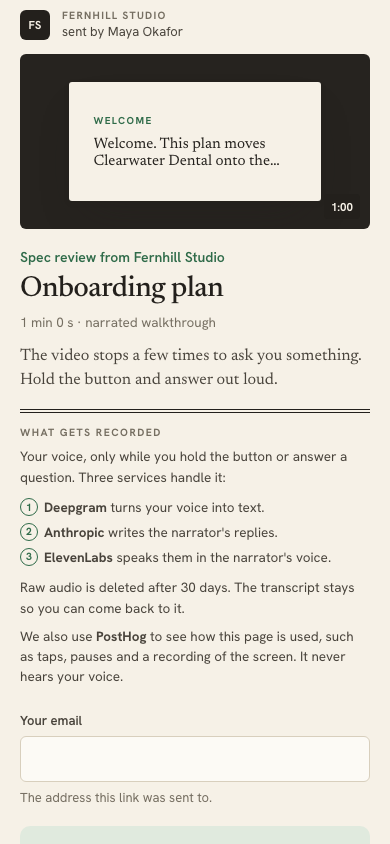
Open the link you were sent. The first screen shows who sent it, the title, and how long the video runs.
Enter the email address the link was sent to. The link only opens for that address. If it isn't accepted, check you're using the address the email or message went to. After five wrong tries, the link locks for five minutes.
Please don't forward the link. It's yours alone. If someone else should watch, ask the sender to send them their own link.
What gets recorded
Before anything starts, the first screen tells you what is recorded.
- Your voice is recorded only while you hold the talk button or answer a question.
- Deepgram turns your voice into text. Anthropic writes the narrator's replies. ElevenLabs speaks them in the narrator's voice.
- The raw audio is deleted after 30 days. The written transcript stays, so you can come back to it.
- PostHog records how the page is used, such as taps, pauses and a recording of the screen. It never hears your voice.
Nothing is recorded until you tap Start. Privacy and data has the detail.
Tap Start
Tapping Start turns on your microphone and sound. Your browser asks for permission to use the microphone. Allow it so you can answer out loud.
If you'd rather not, or the microphone is blocked, you can still watch. Choose Watch without talking. The questions show as text, and you tap Continue to carry on. To turn the microphone on later, allow it for watchalong.io in your browser settings and choose Try the microphone again.
Your screen stays awake while you watch.
Talk to the narrator
The Hold to talk button sits under the video the whole time.
- Press and hold it. The video pauses and the button says Release to send. A counter shows how long you've been talking.
- Say what you want to say.
- Let go. The narrator replies in a few seconds.
You can hold it at any point to ask a question or make a comment, not only when you're asked. A single hold can run for up to a minute. On a keyboard, press Tab until the button is selected, then hold Space or Enter.
The narrator answers from the plan. If the plan doesn't cover what you asked, it says so and notes the question for the sender, who will answer it later.
When the video stops to ask
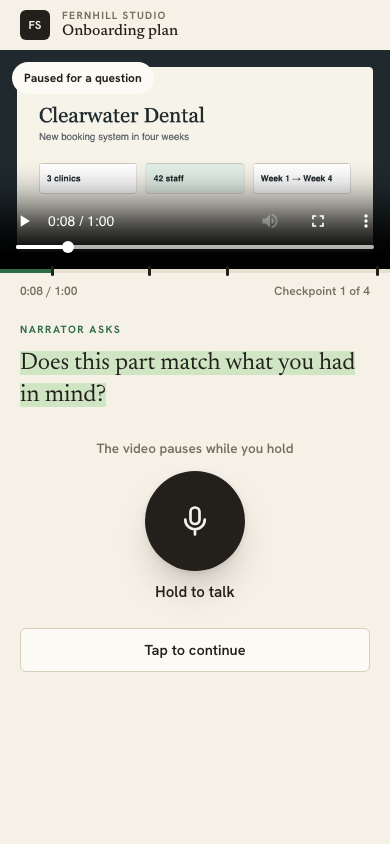
A few times the video pauses and the narrator asks you a question, such as "Did that part make sense?". The marks on the progress bar show where these come.
- Hold the button and answer. There's no wrong answer. Say what you actually think.
- The narrator replies. If you say a part didn't make sense, it may offer to take you back to it. Say yes and the video jumps back.
- When you're done, the video carries on. You can also tap Tap to continue to skip a question.
If the narrator takes more than a few seconds, you'll see "Thinking". If it can't answer in time, it apologises and the video carries on.
Captions
The narrator's replies always show as captions under the video, so you can follow along with the sound off. What you said shows too, under You asked.
At the end
The last question is the closing one. Some ask if you're happy with the work as it is, or if it's ready to go ahead. Answer it the same way. The narrator notes your answer and your reasons.
Then the page turns into your recap.
Your recap
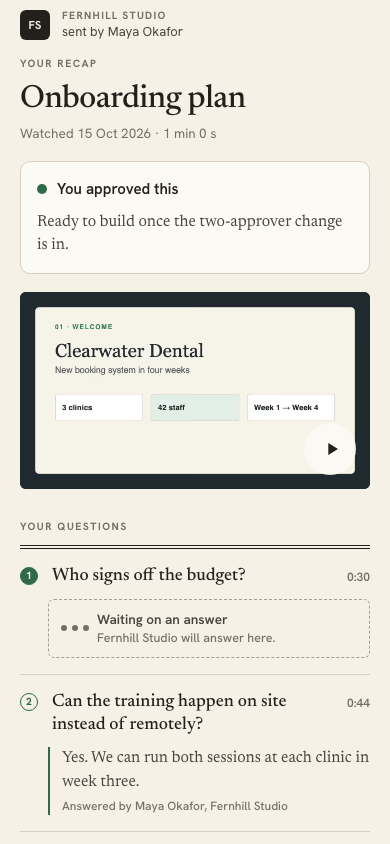
The recap is yours to keep coming back to. It shows:
- whether you approved the work or asked for changes, if you were asked
- the video, to watch again
- the questions you asked, with answers as they come in
- the full transcript. Tap a line to play the video from that moment
- a link to the original plan
Questions the narrator couldn't answer say Waiting on an answer until the sender replies. Their answers appear on the recap as soon as they write them, and they may also email them to you.
Come back later
Open the same link to see your recap again. On the same browser you won't need to enter your email again. The link works for a limited time, usually 14 days from when it was sent to you.
If you leave partway through, open the link again. The video starts from the beginning, and you can skip ahead with the player's controls.
If the link says "This link isn't valid any more", it has expired. Ask the person who sent it for a new one.